US Bank Feeds · SoloOp Paid
Bank transfers.
Meet your invoices.
You did the work. The client sent the transfer. Connect your business bank in SoloOp and incoming payments line up with the right invoice.
Launch price: US$29/month. Keep that rate while continuously subscribed to the same plan. Free core tools are included. Your account confirms your rate before checkout.
A look inside the app
Watch a payment find its invoice.
Inside Bank Feeds
From deposit to paid invoice.
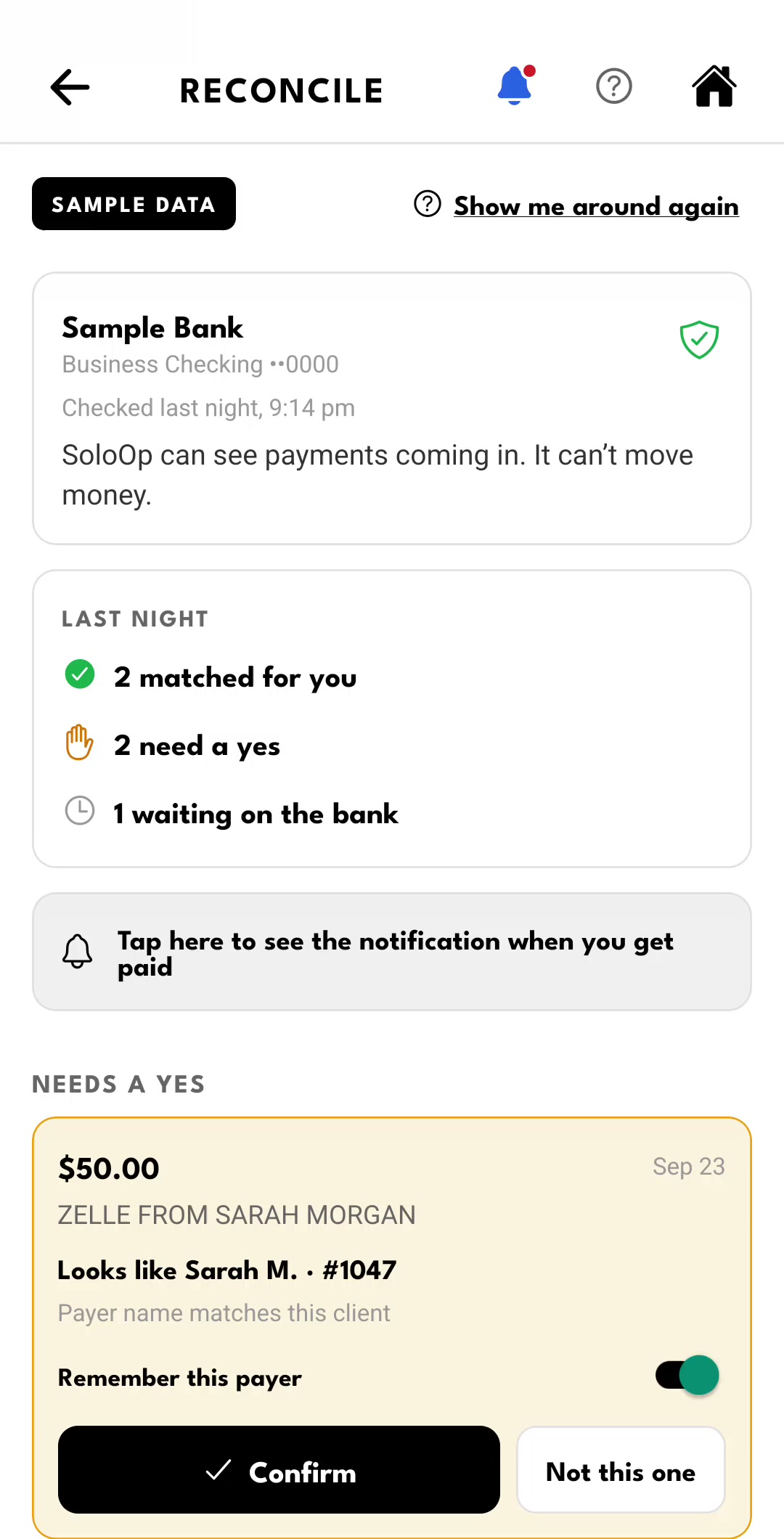
See the bank activity, confirm Sarah's suggested invoice, then watch her next payment match automatically. One walkthrough, from the first look to the result.
Sample data · feature preview. This is a recorded walkthrough, not a live customer bank connection.
Less matching by hand.
Connect your business bank account once. SoloOp lines up incoming transfers with your invoices.
Your bank, connected once — SoloOp can see payments coming in. It cannot move money.
Matched for you — A payment that carries your invoice number is lined up with that invoice, so you can check it and confirm.
Asks once, then remembers — When SoloOp isn’t sure who a payment is from, you confirm it and can tell SoloOp to remember that payer.
Card payouts stay separate — Stripe payouts are recognised, so a card invoice is never counted twice.
Payments appear once your bank posts them, not the moment a client sends one.
Before you connect
How the bank connection works.
You sign in on Stripe’s secure screen. The connection is set up through Stripe (Financial Connections), so your online banking login goes to Stripe and not to SoloOp. SoloOp does not store your online banking password.
Read-only. SoloOp asks to see balances and transactions so it can match payments to invoices. It has no way to move money.
Your choice. Connect or disconnect your bank feed from your dashboard or the app. You don’t need to take card payments through Stripe to use it.
What SoloOp keeps is set out in the Privacy Policy: the institution name, masked account details, balances and the transactions used for matching.
Choose Paid. Connect your bank.
- Create your account for SoloOp Paid, or choose Paid on your existing account. Complete Stripe checkout at the rate shown.
- Open Bank Feeds in your dashboard, or use SoloOp on your phone.
- Choose Link bank and follow Stripe’s secure screen.
At your desk or on the job
On your phone: Invoices › Payments › Link your bank.
SoloOp Free vs SoloOp Paid
Free core.
More with SoloOp Paid.
Run your schedule, clients and invoices for free. Choose Paid to track the miles, match bank transfers automatically and pay lower online payment fees. SoloOp-sent SMS is coming next.
Swipe the table to compare both plans.
| What’s included | Free · $0/month | Paid · $29/month |
|---|---|---|
| Bank statements & transfers | Manual uploads & matching | Automatic Bank Feeds & matching |
| Mileage tracking | Not included | Included · trips & miles |
| SoloOp-sent SMS | Not included | Coming soon250 credits/month when available |
| US card payment processing | 2.9% + $1.00 | 2.9% + $0.30 |
| US ACH payment processing | 0.8% + $1.00 · $6 cap | 0.8% · $5 cap |
| Scheduling, routing & recurring jobs | Included | Included |
| Clients, quotes, invoices & AutoPay | Included | Included |
| Expenses & receipts | Included | Included |
| Client messages from your phone | Included | Included |
SoloOp-sent SMS is coming soon, with 250 monthly credits for Paid businesses when available. Longer messages use more than one credit; extra packs cost more. Free users send through their own phone’s texting app; mobile provider charges apply.
Launch price: US$29/month. Keep that rate while continuously subscribed to the same plan. If you cancel and rejoin, the price available then applies. Processing fees apply per online payment; card fees are uncapped.
Create your account, choose your subscription, then connect your bank in SoloOp. A subscription starts only after you complete checkout. Australia’s core app stays free; Bank Feeds is not yet available there.
In Australia? Bank Feeds is coming.
There’s no date yet. Join the list and we’ll tell you when it’s ready.
Prefer to match payments by hand? The bank-statement upload is still there — see what else is in the app.