Help improve SoloOp? With your permission, we measure website journeys and use Microsoft Clarity heatmaps and recordings on public pages. Form contents and private business screens are excluded. Privacy details

Skip to content

Australia · Free lawn care & field service app

Your run sorted.
Your evening back.

The jobs, the invoices, the money coming in. Keep it all together in one app, built by an operator who runs a lawn-care round too.

$0/month for core tools. No credit card to sign up.

How payment processing fees work

Running a business in the US? See SoloOp for the US →

Your working day, in one place
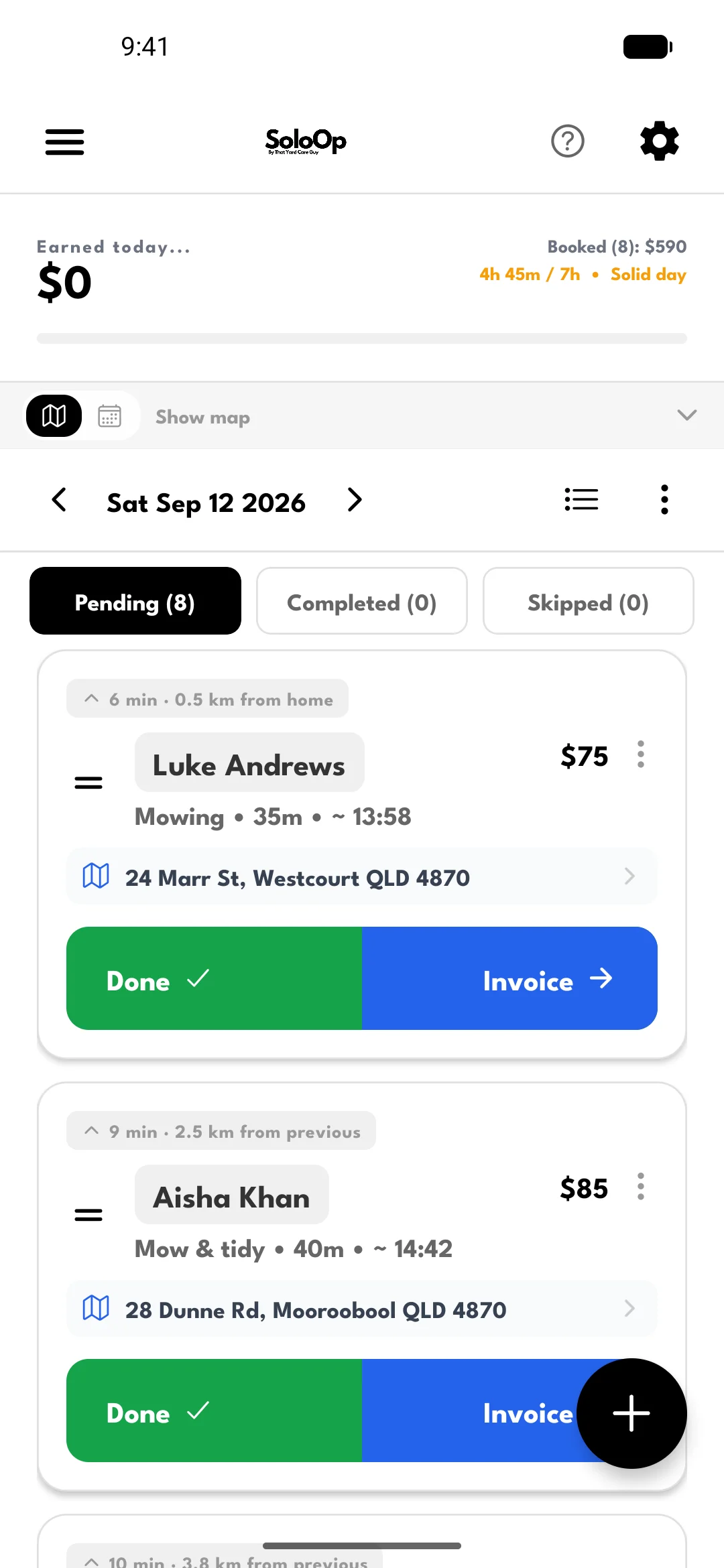
SoloOp daily run sheet with eight scheduled jobs, completion and invoice actions
Earlier app capture. Example Australian jobs.

For the person doing the work
and running the business.

  • Solo operators & small crews
  • iPhone, Android & web admin
  • Recurring rounds & one-off jobs
  • Your run sheet, even with no signal

01 Plan the run

A full day.
A clearer head.

See who's booked and where you're going. Open the map to see your jobs in run order, then tuck it away for more room on your run sheet.

Adding a job? Gravity suggests a day and time based on the work already in your schedule.

  • Keep regular clients on a recurring schedule.
  • Open the next address in your preferred maps app.
  • Rained out? Choose visits to move, review the plan, then message clients.
  • Mark jobs done with no signal — it syncs when you're back on the road. Moving jobs, invoicing and payments need internet.
Explore job scheduling
The map, when you need it.

Recorded in SoloOp.

02 Finish the job

Tools down.
Invoice sent.

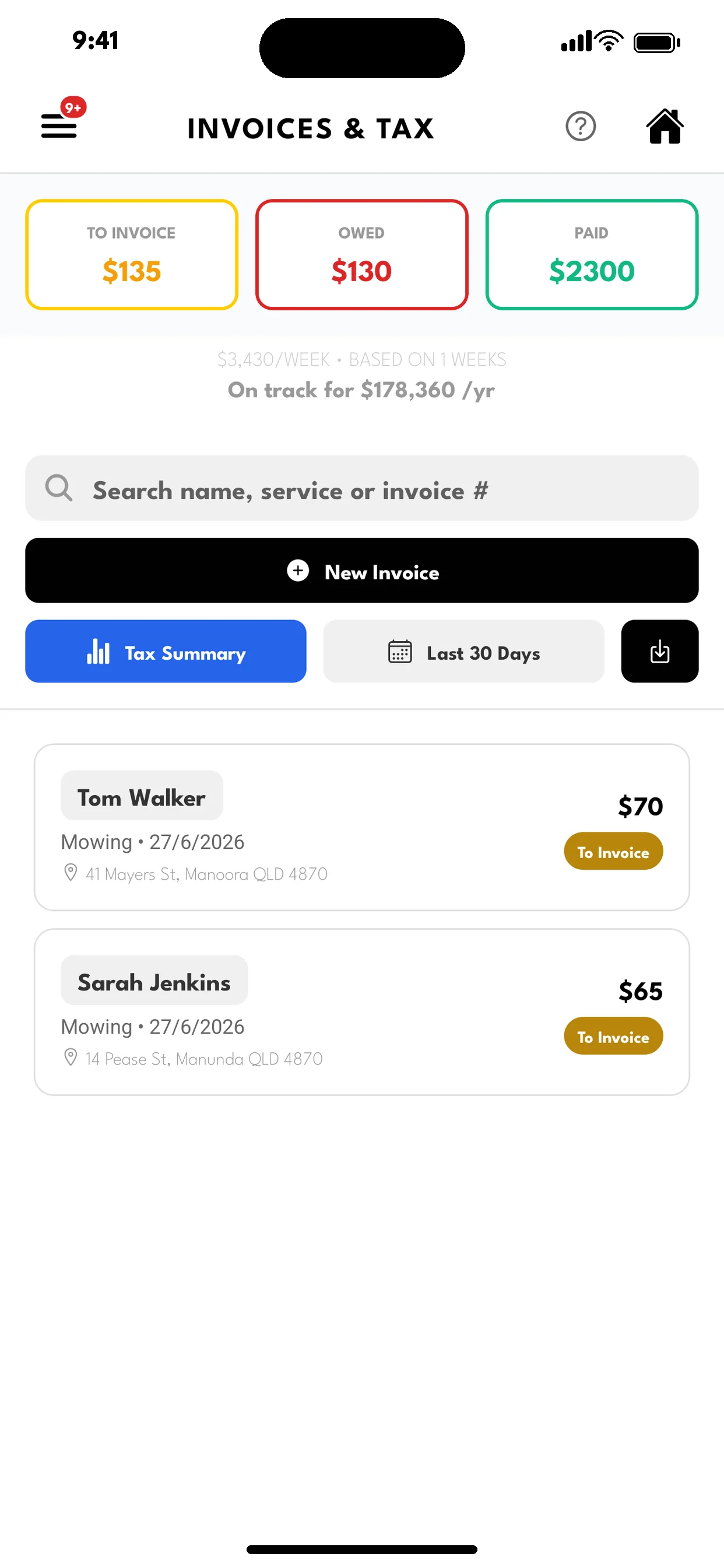
Mark the job done, check the amount and send a branded invoice. Keep track of what's still to invoice, what's owed and what's been paid.

  • Send invoices by email or share a payment link.
  • Clients can pay online from their invoice link.
  • Record cash and direct bank-transfer payments.

For regular work, clients can approve AutoPay so you can charge their saved payment method after the job.

Online payments require Stripe setup. Methods and fees vary by region. How AutoPay works

Explore invoicing
Earlier SoloOp invoice list with sample to-invoice, owed and paid totals and a projection from example data
See what's done and what's still owing.
Sample invoice figures and projection.

03 Keep on top of the money

Your figures.
Already together.

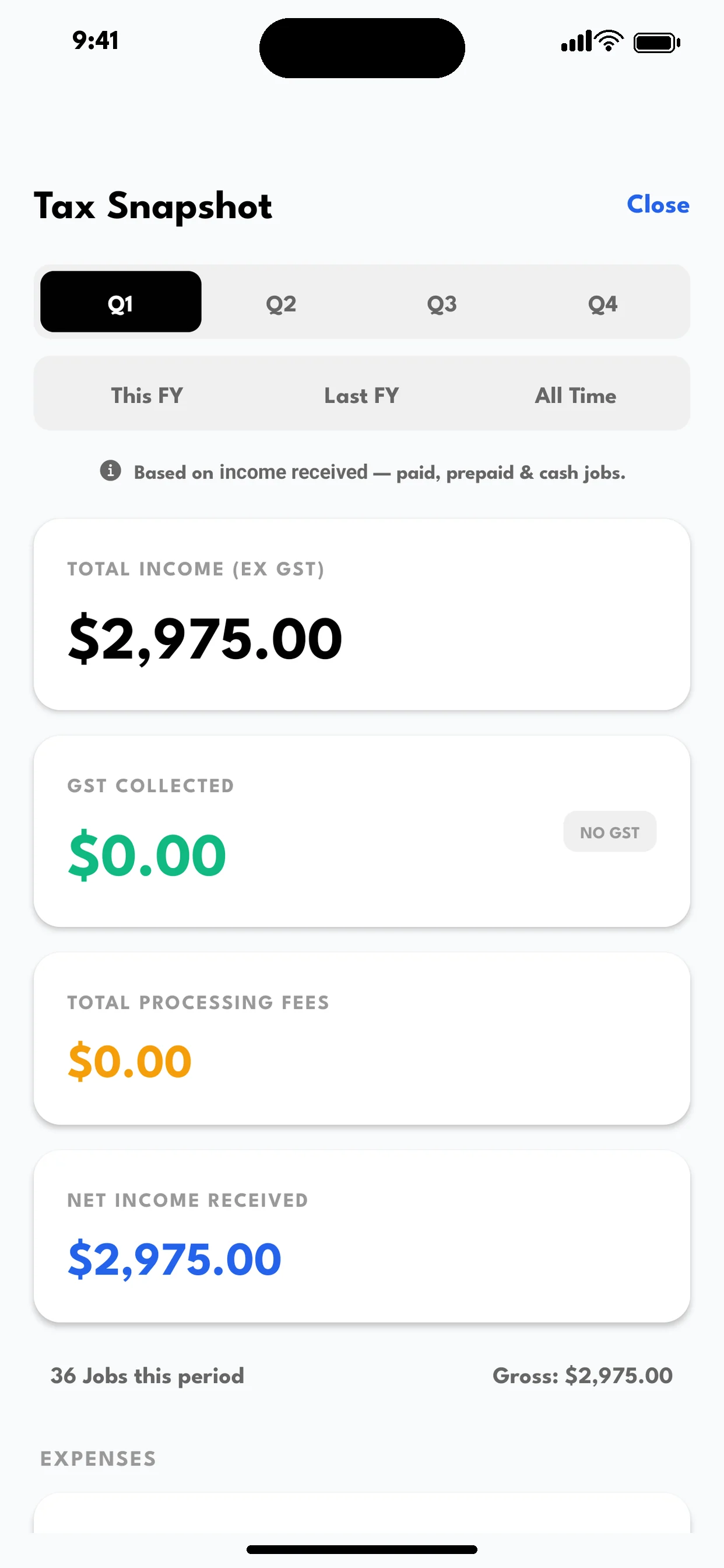
Open Reports from Invoices to review income received, tax collected, processing fees and expenses. Switch between quarters or financial years to see how the business is tracking.

Your accountant logs in.
You get on with the job.

Invite your accountant to their own read-only portal. They can view your income, expenses and tax summaries directly, and grab what they need. No spreadsheets for you to export and send.

Explore the accountant portal
Earlier SoloOp tax summary opened from Invoices, with sample income, GST, processing fees and net income
Tax summary from Invoices, with example data.
An earlier capture; the current screen is called Reports.

Between the jobs

The drive counts.
The client stays in the loop.

Mileage · Australia

Drive the round.
Let SoloOp track the kilometres.

Turn Mileage on once, then get on with your jobs. SoloOp builds your driving record between stops as you work.

Your business kilometres add up alongside the jobs you finish, with a monthly summary for tax time. Check a trip when it needs your attention, instead of keeping a mileage diary after every drive.

Mileage remains included for Australian businesses. US miles · Australian kilometres. Automatic recording runs on the owner’s phone, with background location permission and a supported app version.

How drive recording works

After you opt in, SoloOp uses location in the background to record drives, even when the app is closed. Enabling recording also turns on automatic job timers on supported phones: arrival and departure at your job sites help start and finish each drive.

Turn recording off in Mileage at any time. Job timers have their own switch in Settings and stay on until you turn them off. Android may also ask you to allow unrestricted battery use.

When the drive recorder isn’t available, trips can still build from road distances between job locations. Check missing or uncertain distances and review which trips were business driving.

Explore mileage
SoloOp-sent SMSComing soon

A quick update.
One less loose end.

“On my way”, booking confirmations, reschedules and invoice links, sent through SoloOp with your business name.

SoloOp-sent SMS is in a limited Australian pilot and isn’t open to everyone yet.

Already available: prepare a client message in SoloOp and send it through your phone’s texting app. Your mobile provider’s charges apply.

Follow SoloOp updates

Start with one client.
Build from there.

You don't have to move your whole business in one sitting. Try SoloOp on a real job and get comfortable with the daily routine.

  1. 1

    Make it yours

    Create your account and add your business details, ready for your invoices.

  2. 2

    Book one real job

    Add a client, choose a service and put the job into your schedule.

  3. 3

    Use it on the day

    Open your run, finish the job and send the invoice. Add the rest of your round when you're ready.

Straightforward from the start

Core tools, free.
Here's how it works.

See fees for your region

$0/month

Free scheduling, invoicing and client management.

Online payments: Australian operators absorb processing fees from 1 October 2026. Other regions can choose to pass or absorb them. Rates and methods vary by region.

Cash or direct bank transfer: record the payment in SoloOp with no SoloOp processing fee.

Nathan, the lawn-care operator behind SoloOp

Built for operators. By an operator.

I use it on my round, too.

“I run a lawn-care round. SoloOp is the app I wanted and couldn't find.”

Nathan, SoloOp founder

The story behind SoloOp

A few things
worth knowing.

Read all FAQs
Is SoloOp right for my business?

SoloOp is built around lawn-care rounds and other field-service work: clients, recurring or one-off jobs, scheduling and invoicing. Solo operators and small crews can use it. Explore the full feature list to check it against the way you work.

Do I have to set up online payments first?

Stripe setup is needed to collect online payments through SoloOp. You can also record cash and direct bank-transfer payments. Read the payment and fee details before choosing what suits your business.

How do I install it?

Get the iPhone app from the App Store. Android is currently a direct APK download while Google Play approval is pending, so your phone may ask you to allow installation from your browser. Use the download links below. You can also sign up and manage your account on the web.

Can I use it outside Australia?

Website signup also offers United States and United Kingdom account regions. Choose your business country during app setup and review your tax settings. Payment methods and some features vary by country. Check the regional pricing page for payment details, or contact support if your country is not listed at signup.

Ready for your next run

Put SoloOp
to work.

Download the app. Start with one client and one job.

Android uses a direct install. iPhone uses the App Store.

Prefer to sign up on the web?

Got a question
before you start?

Tell us how you run your business or where you're getting stuck.

support@solo-op.com

Contact Us