Help improve SoloOp? With your permission, we measure website journeys and use Microsoft Clarity heatmaps and recordings on public pages. Form contents and private business screens are excluded. Privacy details
Your schedule, clients, jobs and invoices belong in the same app you take into the field. SoloOp keeps the day moving, then helps you see where the money landed.
US Bank Feeds, Mileage and lower online payment fees. SoloOp-sent SMS is coming soon. Keep your launch rate while continuously subscribed to the same plan. Cancel anytime.
Earlier Australian sample run in the Android app. US Bank Feeds is shown separately below.
For the person doing the work and running the business.
Schedule jobs & recurring rounds
Quote, invoice & track payment
iPhone, Android & web admin
01 Plan the run
A full day. One clear plan.
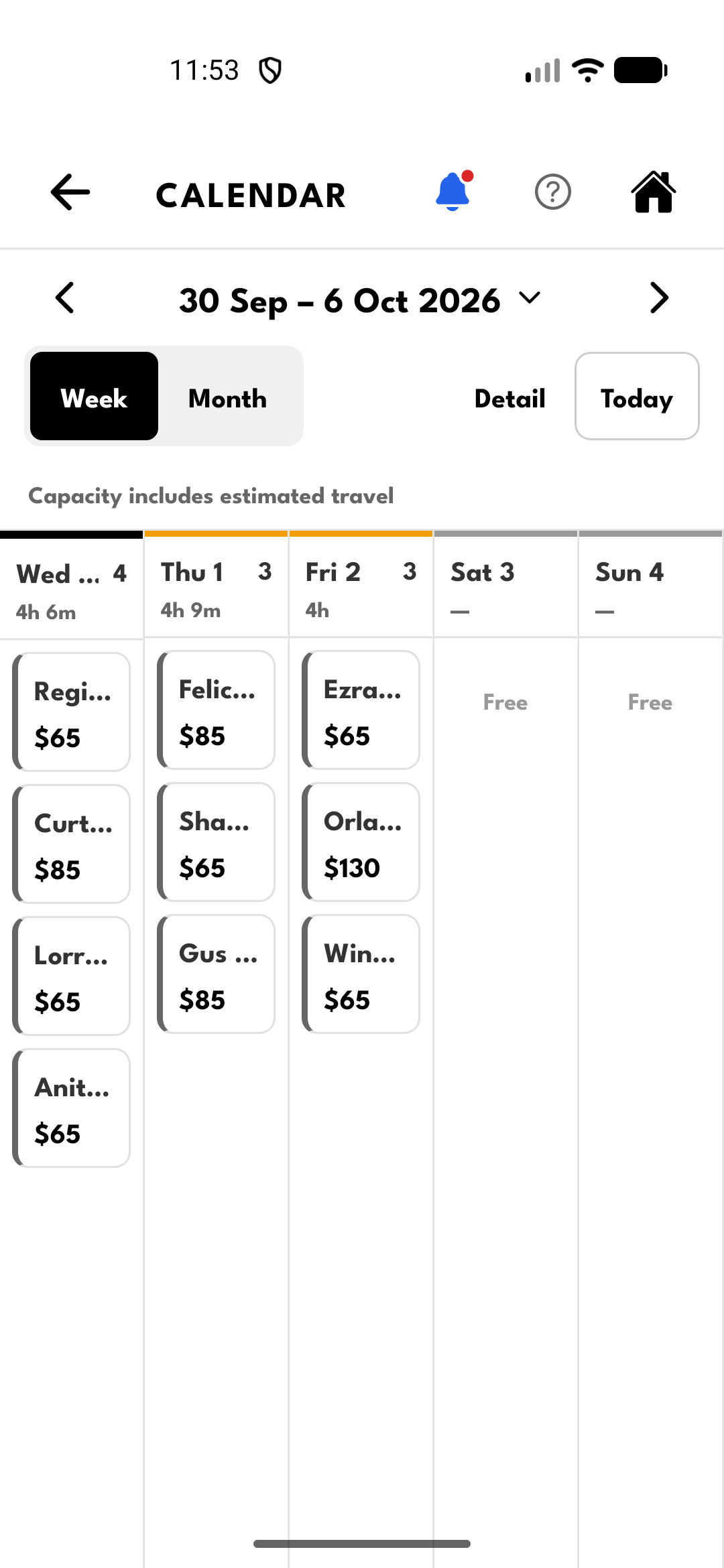
See the week at a glance: who’s booked, what each job is worth and how full each day is. Put repeat clients on a recurring schedule, then open the day’s run sheet when it’s time to work.
Keep clients, addresses and job notes together.
Open the next address in your maps app.
Mark jobs done when you’re offline; they sync when you’re back.
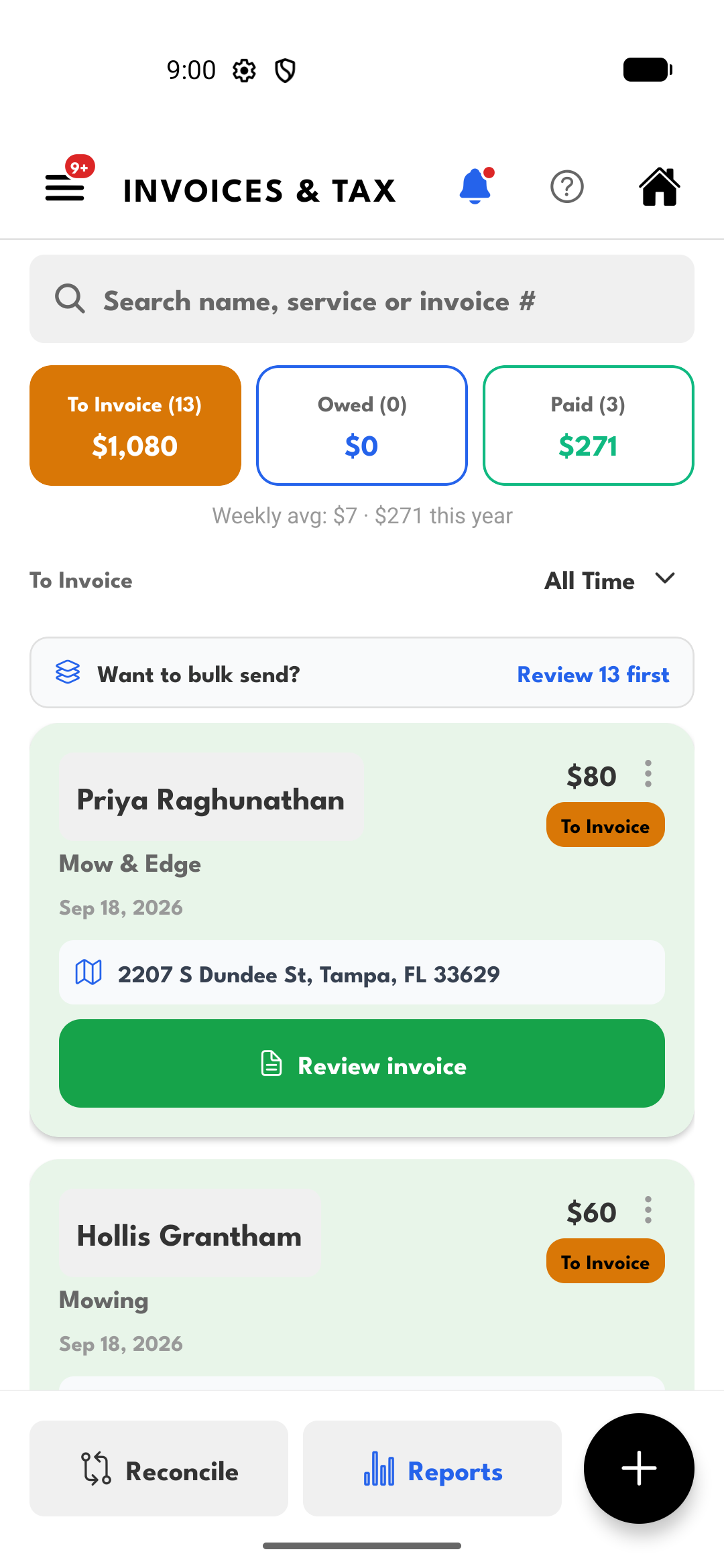
Turn completed work into an invoice without rebuilding the client, service and price in another tool. See what still needs an invoice, what’s owed and what’s been paid.
Send an invoice or share its payment link.
Let clients pay online, or record cash and direct transfers.
US app capture with sample client and invoice data.
03 Know what landed
A bank transfer shouldn’t mean another search.
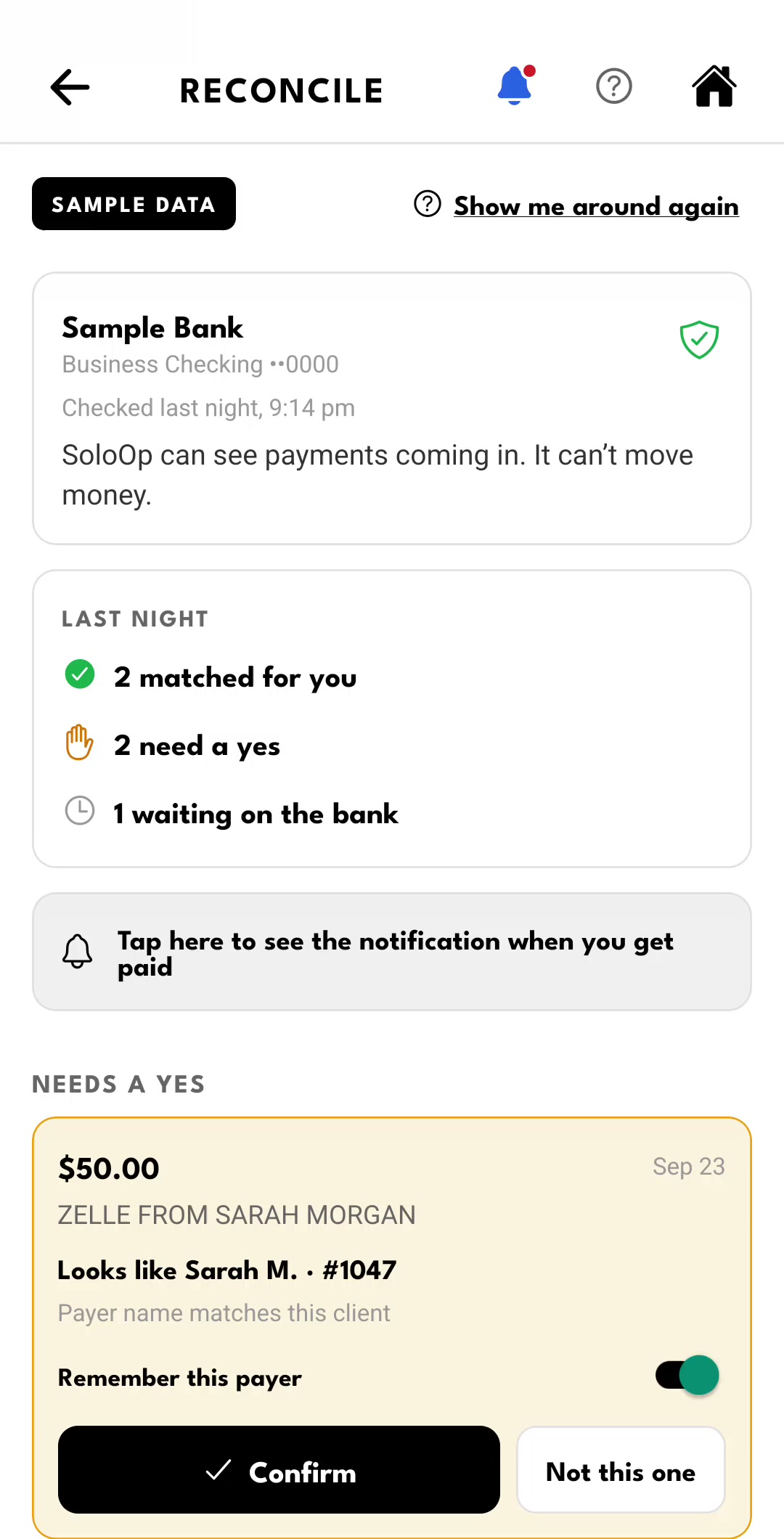
SoloOp Paid connects your US business bank and brings incoming transfers beside your invoices. It matches payments and asks for your answer when a transfer needs checking, so you can get on with the next job.
Inside Bank Feeds
From deposit to paid invoice.
See the bank activity, confirm Sarah's suggested invoice, then watch her next payment match automatically. One walkthrough, from the first look to the result.
Sample data · feature preview. This is a recorded walkthrough, not a live customer bank connection.
The recording could not load; the sample screen is shown.
Between the jobs
The drive counts. The client stays in the loop.
Mileage · SoloOp Paid in the US
Drive the round. Let SoloOp track the miles.
Turn Mileage on once, then get on with your jobs. SoloOp builds your driving record between stops as you work.
Your business miles add up alongside the jobs you finish, with a monthly summary for tax time. Check a trip when it needs your attention, instead of keeping a mileage diary after every drive.
Mileage is included in SoloOp Paid for US businesses; it remains included for Australian businesses. US miles · Australian kilometres. Automatic recording runs on the owner’s phone, with background location permission and a supported app version.
How drive recording works
After you opt in, SoloOp uses location in the background to record drives, even when the app is closed. Enabling recording also turns on automatic job timers on supported phones: arrival and departure at your job sites help start and finish each drive.
Turn recording off in Mileage at any time. Job timers have their own switch in Settings and stay on until you turn them off. Android may also ask you to allow unrestricted battery use.
When the drive recorder isn’t available, trips can still build from road distances between job locations. Check missing or uncertain distances and review which trips were business driving.
“On my way”, booking confirmations, reschedules and invoice links, sent through SoloOp with your business name.
Coming to SoloOp Paid for US businesses, with 250 monthly credits when available. Sending is still in a limited pilot; longer messages use more than one credit.
Already available: prepare a client message in SoloOp and send it through your phone’s texting app. Your mobile provider’s charges apply.
Keep the client history, quotes and expenses close to the jobs that created them. When your accountant needs a clearer view, invite them into a read-only portal for income, expenses and summaries.
Addresses, notes, quotes and invoices stay connected to the client.
02 / EXPENSESSee what running the work costs.
Keep expense records and receipts with the rest of your business details.
03 / ACCOUNTANTGive them a view of the numbers.
Your accountant can use their own read-only portal instead of waiting for another export.
A closer look at SoloOp.
The calendar, clients, invoices and reports from the US app. Open any screen for a closer look.
Earlier US app captures, including Android 2.5.0, with sample client data; the current layout may differ. Reports opens from Invoices. Bank Feeds screens show the in-app sample walkthrough, not a live bank connection. Swipe to browse, tap to enlarge.
SoloOp Paid · United States
The field app and the money story, together.
Run your schedule, clients, quotes and invoices in SoloOp. Paid brings bank transfers beside your invoices, tracks the miles between jobs and lowers online payment fees. SoloOp-sent SMS is coming soon.
Choose SoloOp Paid Launch price: US$29/month. Keep it while continuously subscribed to the same plan. Connect your bank in SoloOp after checkout.
SoloOp Free vs SoloOp Paid
Free core. More with SoloOp Paid.
Run your schedule, clients and invoices for free. Choose Paid to track the miles, match bank transfers automatically and pay lower online payment fees. SoloOp-sent SMS is coming next.
Swipe the table to compare both plans.
Plans for US businesses · prices in USD
What’s included
Free · $0/month
Paid · $29/month
Bank statements & transfers
Manual uploads & matching
Automatic Bank Feeds & matching
Mileage tracking
Not included
Included · trips & miles
SoloOp-sent SMS
Not included
Coming soon250 credits/month when available
US card payment processing
2.9% + $1.00
2.9% + $0.30
US ACH payment processing
0.8% + $1.00 · $6 cap
0.8% · $5 cap
Scheduling, routing & recurring jobs
Included
Included
Clients, quotes, invoices & AutoPay
Included
Included
Expenses & receipts
Included
Included
Client messages from your phone
Included
Included
SoloOp-sent SMS is coming soon, with 250 monthly credits for Paid businesses when available. Longer messages use more than one credit; extra packs cost more. Free users send through their own phone’s texting app; mobile provider charges apply.
Launch price: US$29/month. Keep that rate while continuously subscribed to the same plan. If you cancel and rejoin, the price available then applies. Processing fees apply per online payment; card fees are uncapped.
Create your account, choose your subscription, then connect your bank in SoloOp. A subscription starts only after you complete checkout. Australia’s core app stays free; Bank Feeds is not yet available there.
Start with the work you do today
Bring your next job into SoloOp.
Choose Paid for US Bank Feeds, Mileage and lower online payment fees, with SoloOp-sent SMS coming soon. Or start with the free core app.